Publish your daily menu with just a photo
AI organises it for you, and your dishes and menus are saved so you can repeat them with one tap. Nearby customers see it straight away. Try it free for up to 60 days, no card needed.
 Menu published. Your customers can see it.

 Coming sooniPhone, for customers
Publish your menu in a minute
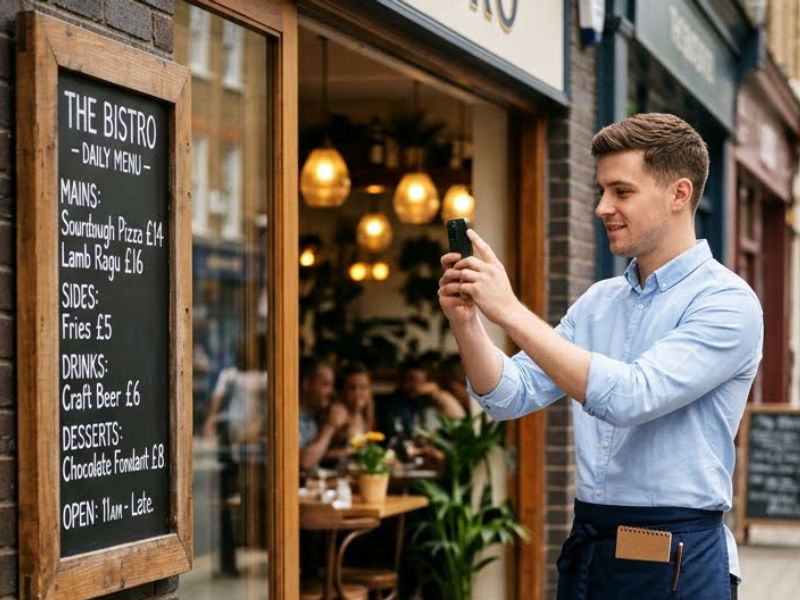
Take a photo
Of the blackboard, the handwritten sheet or the printed menu.
AI organises it
It detects starters, mains, desserts, supplements, price and allergens.
Check and publish
Fix anything you need and publish it straight away or schedule it. Your followers get a notification.
Your menu, without wasting time
The app remembers your dishes and menus, so the cook can get on with cooking.
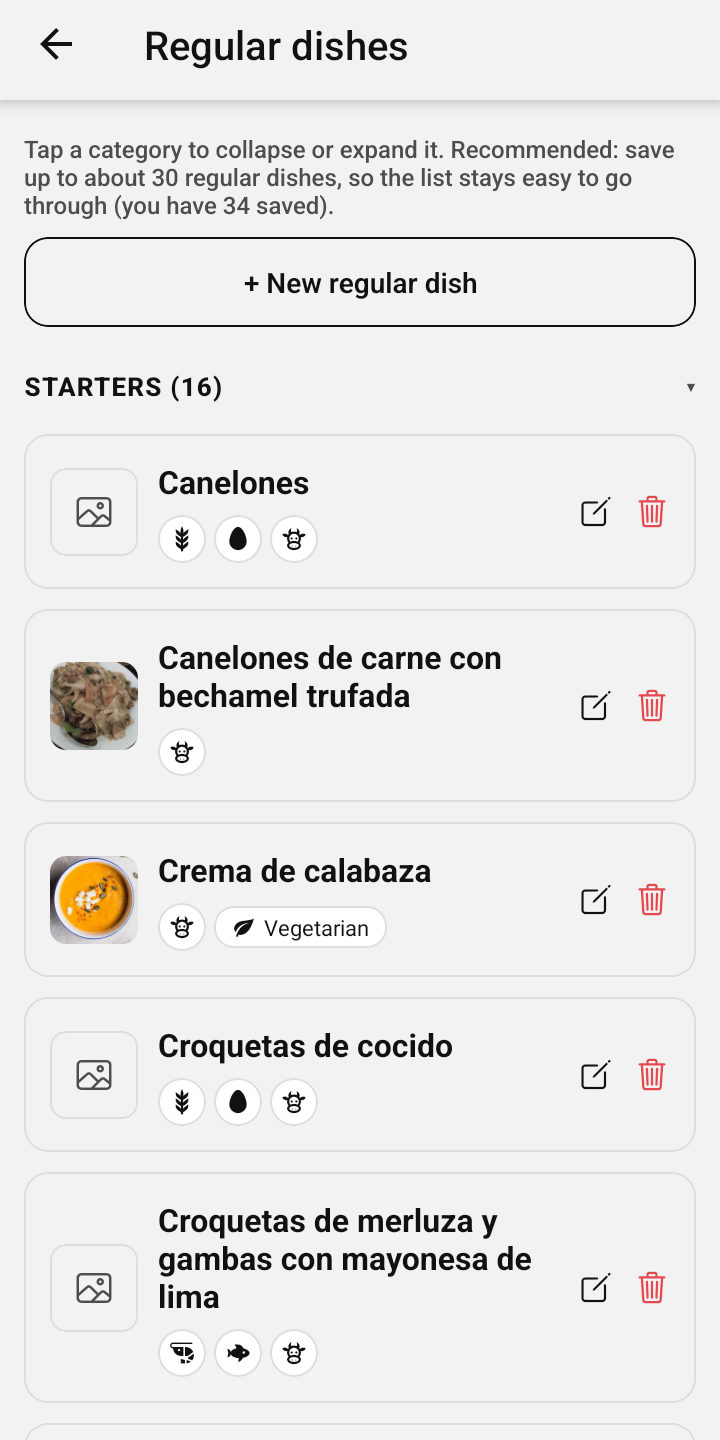
Your dishes, always at hand
With photo, allergens and supplement, ready for any menu.
Complete menus
Monday’s or the summer one, saved for when it’s time.
Repeat yesterday’s
With one tap, changing only what you need.
Allergens, just once
Every saved dish keeps them.
Got a website?
Import your details, photos, menu and deals.
Prepare tomorrow’s today
With the plan, it publishes itself at the time you choose.
Your customers, your followers
Your regulars are your best audience: every day they’ll see your menu on their phone and share it with the people they eat with.
On the door and the tables
Your poster: when they scan it, they follow you.
Tell them when they pay
“Would you like to see our menu on your phone every day?”
Share your link
In your stories, on Google Maps and on your website.
Every follower brings more
They forward your menu: new customers without spending on advertising.
Reach more customers
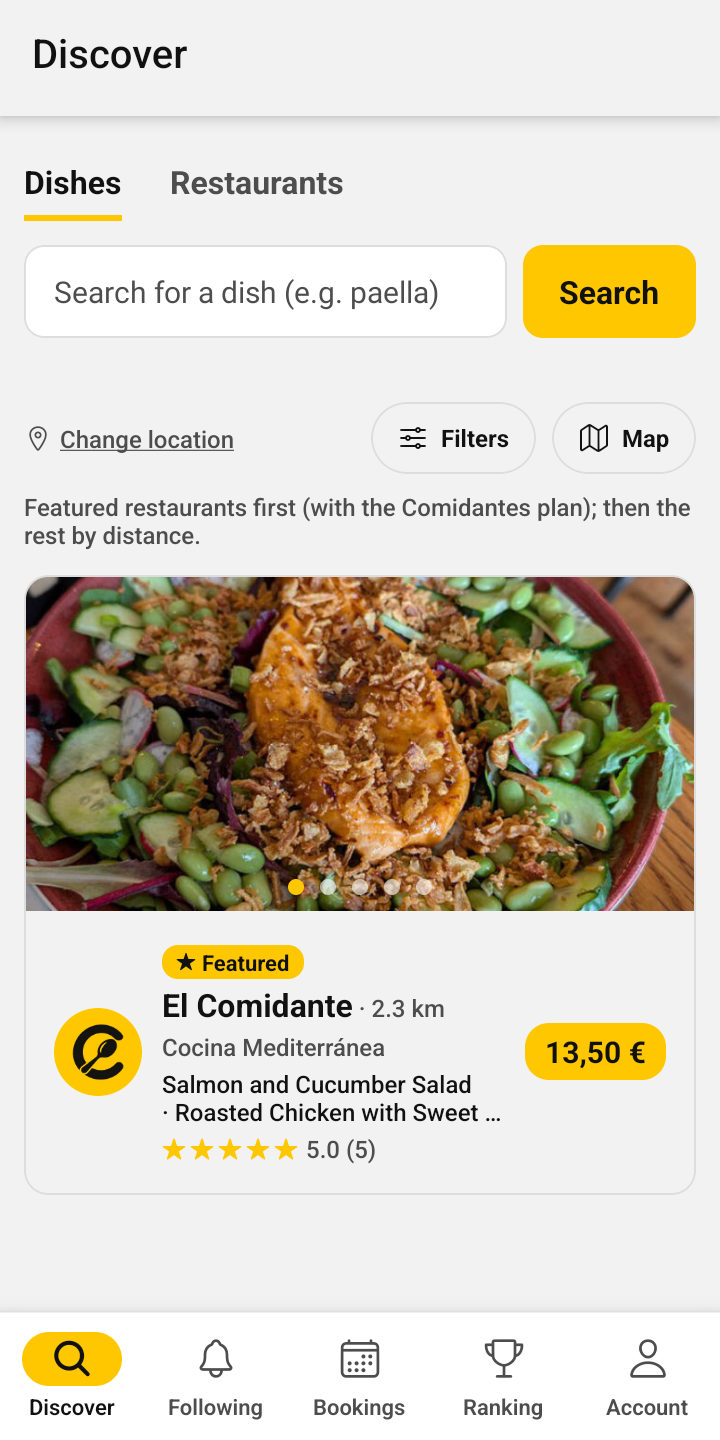
Your menu appears just when people are deciding where to eat.
They find you nearby
In a list and on the map, and by your name or cuisine.
By their favourite dish
Anyone searching for “paella” finds you if you serve it today.
In their alerts
We let them know when you publish the dish they’re waiting for.
Your followers, notified
They get your menu mid-morning or as soon as you publish.
Vegetarian, vegan and services
Terrace, dogs, wheelchair access…: you show up for people looking for them.
Your city’s ranking
Good ratings move you up.
No daily menu? Publish your deals
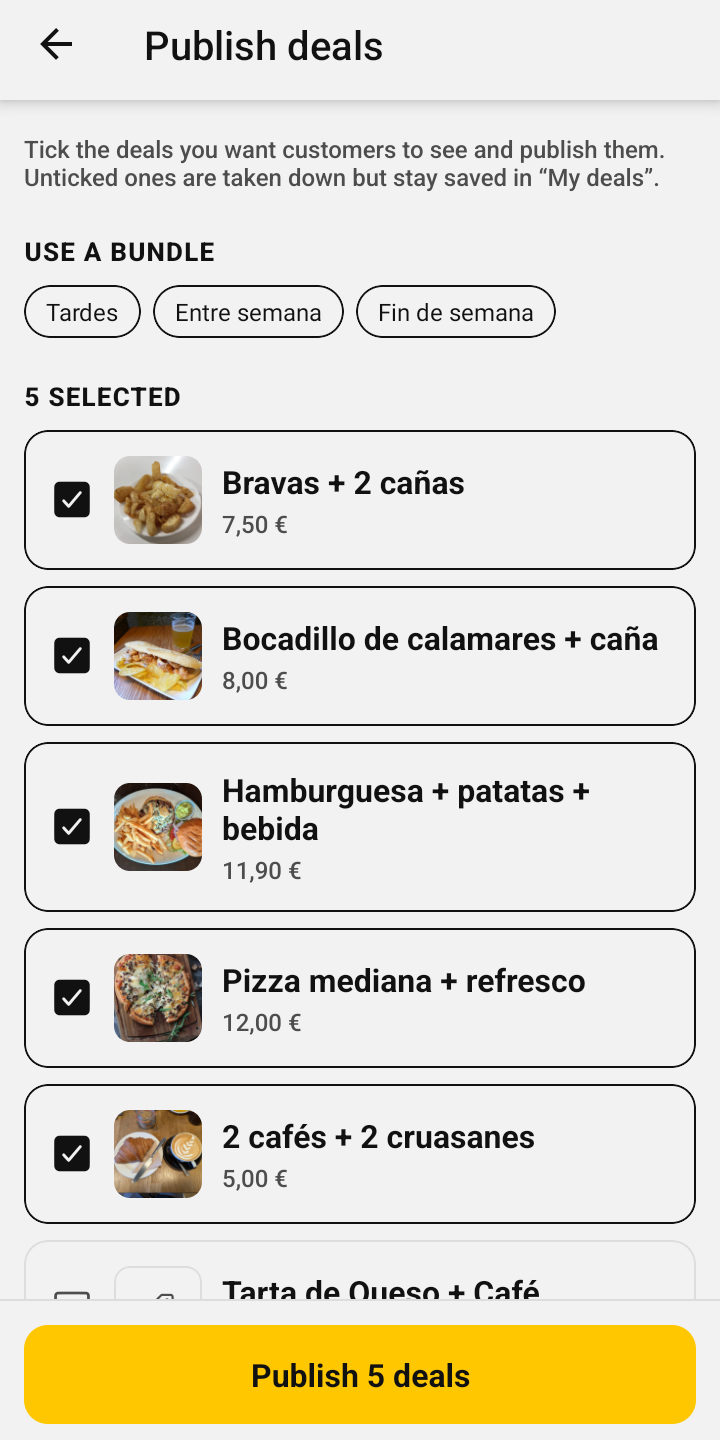
For fast food, cafés, bakeries or takeaways: free for up to 10 at a time; with the plan, unlimited and with your full menu.
Products and packs at a set price
“Patatas bravas + 2 beers · €7”, with photo and allergens.
They don’t expire
Create them once and publish them whenever you like.
With their own hours
Breakfast until 12, afterwork from 6 to 8 pm.
Deal bundles
“Weekend”, “Summer”…: all of them at once.
Already on a poster?
AI reads them from a photo, a PDF or your website.
In Discover, with your “from” price
Next to the daily menus, with the “Deals” label.
Made for every day
What a restaurant needs during service, without complications.
Daily reminder
If you haven’t published your menu by your time, we remind you.
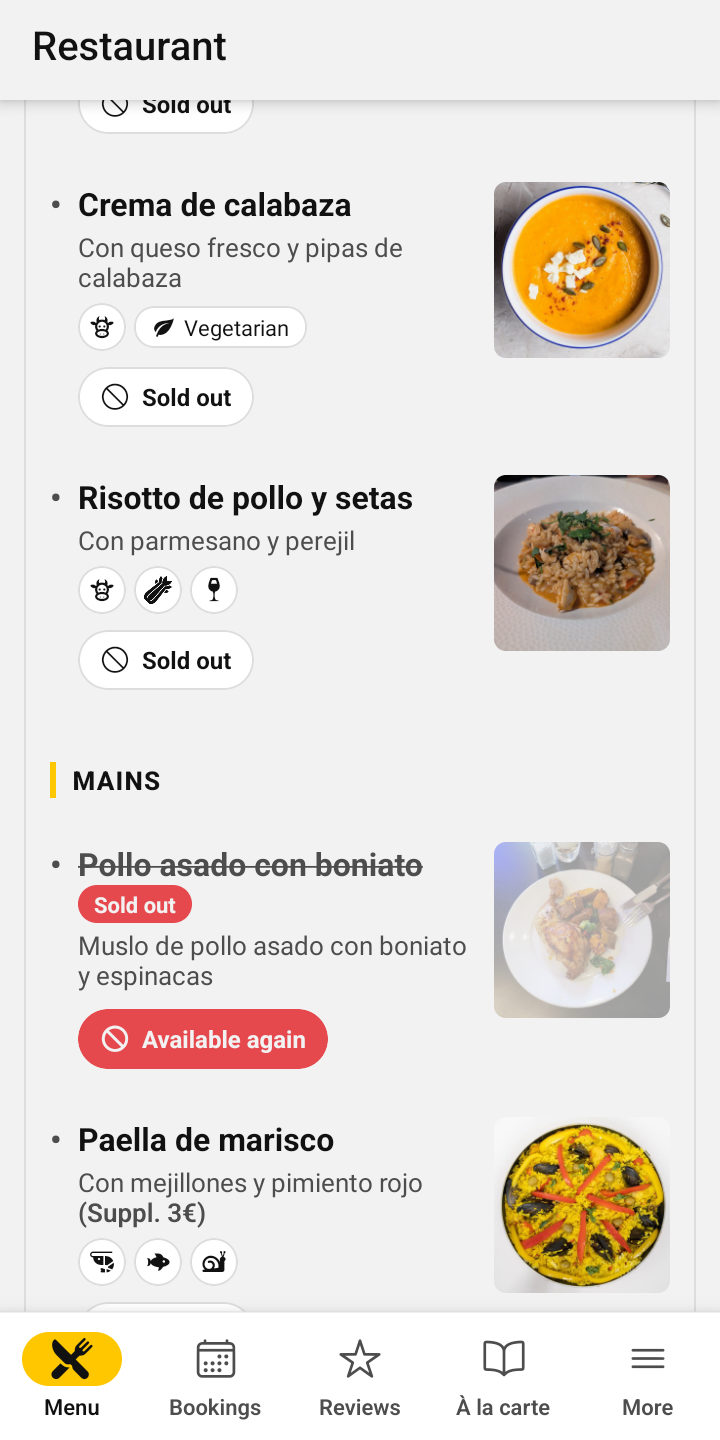
Mark what’s sold out
Your customers see it crossed out before they go.
Your full menu, always visible
From a photo, a PDF or your website: AI organises it.
Complete page
Opening hours, services, map, social media and booking buttons.
Closed for holidays or refurbishment
With your message on your page; it clears itself when you reopen.
Delivery orders
Your Glovo, Just Eat, Uber Eats or own links. Free.
Several venues? Run them from one account
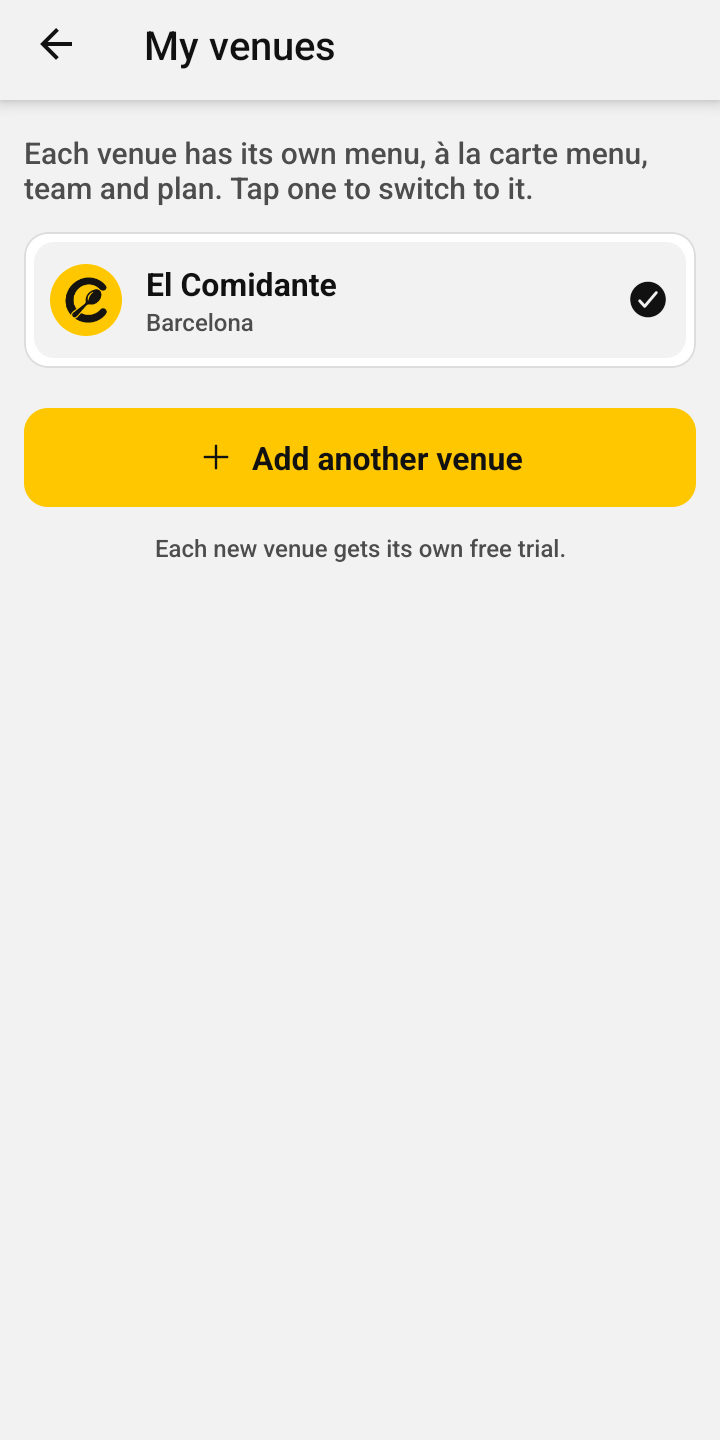
For groups and chains: each venue with its own menu, à la carte menu and team.
Switch venues instantly
And each with its own free trial.
The same menu at all of them
When you publish, it goes out at all of them at once.
Copy from one to another
Full menu, deals, dishes and saved menus.
A manager at each venue
They run their venue; the plan and payments stay yours.
Each venue’s team
They publish the menu and handle bookings.
One payer
One subscription per venue, all in your name.
Bookings without the phone
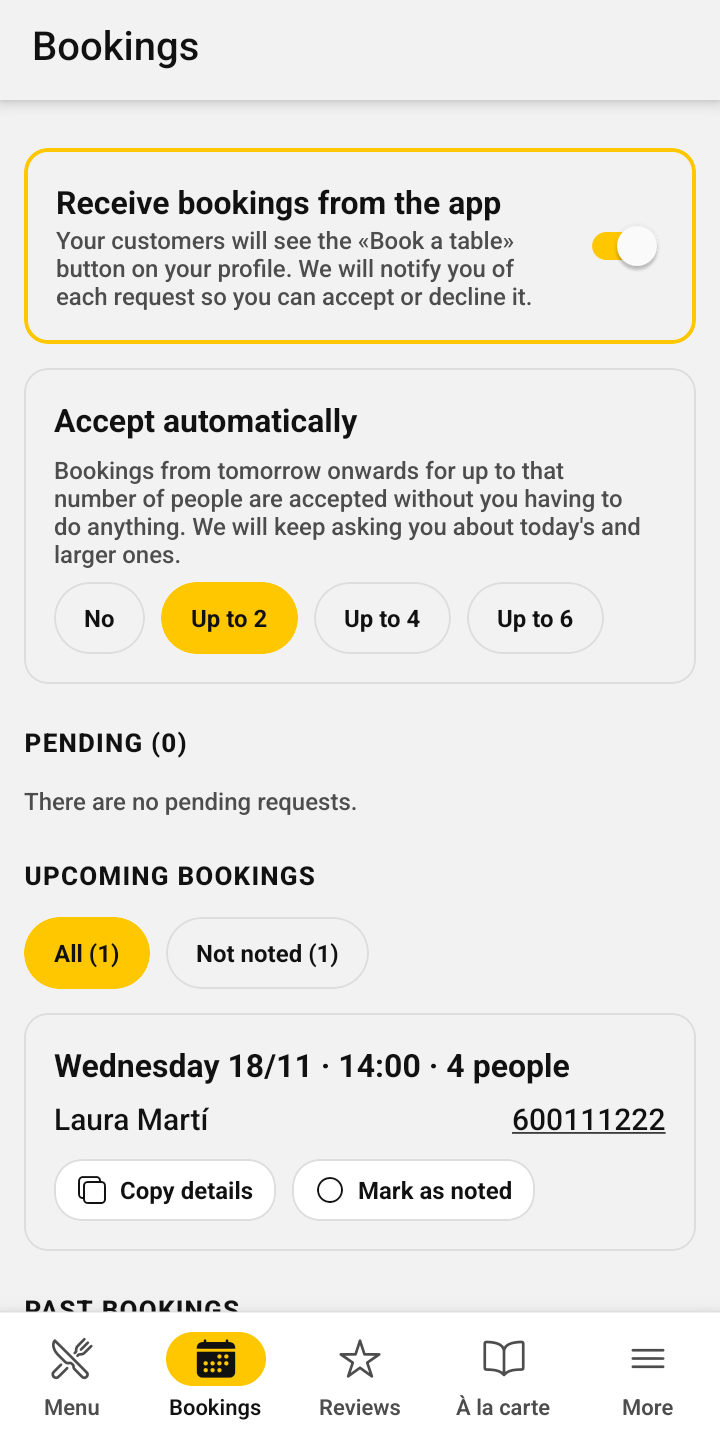
Your customers request a table from the app, without interrupting service to answer calls.
Complete requests
Day, time within your hours, people and phone number.
Accept or decline with one tap
And the customer gets your answer straight away.
You decide
Turn them on whenever you want. No commission per booking.
Small ones accepted automatically
From tomorrow on, up to 2, 4 or 6 people.
Fewer empty tables
We remind the customer, and you note who doesn’t show up.
Got your own system?
Copy its details and mark it as noted.
See how you’re doing
Simple numbers to make decisions, without spreadsheets.
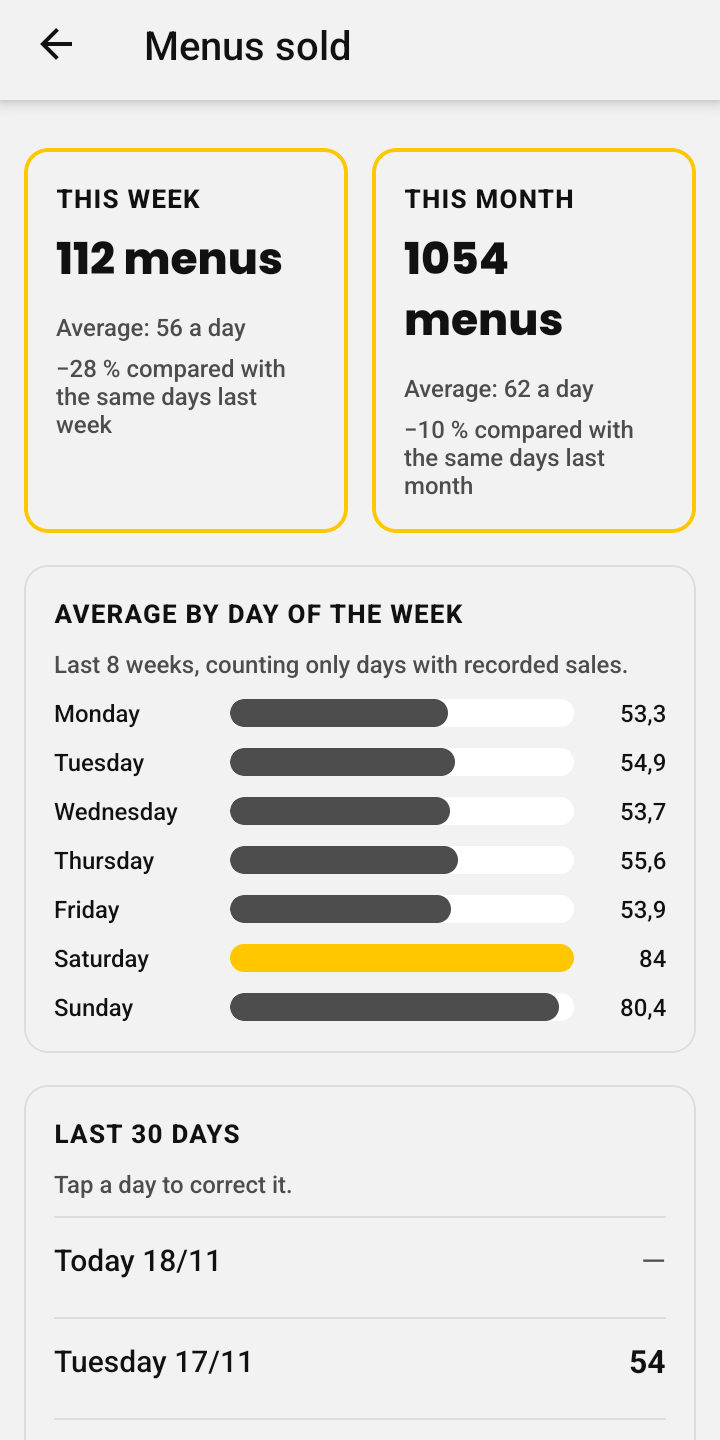
Menus sold
Compare them with the previous week and month.
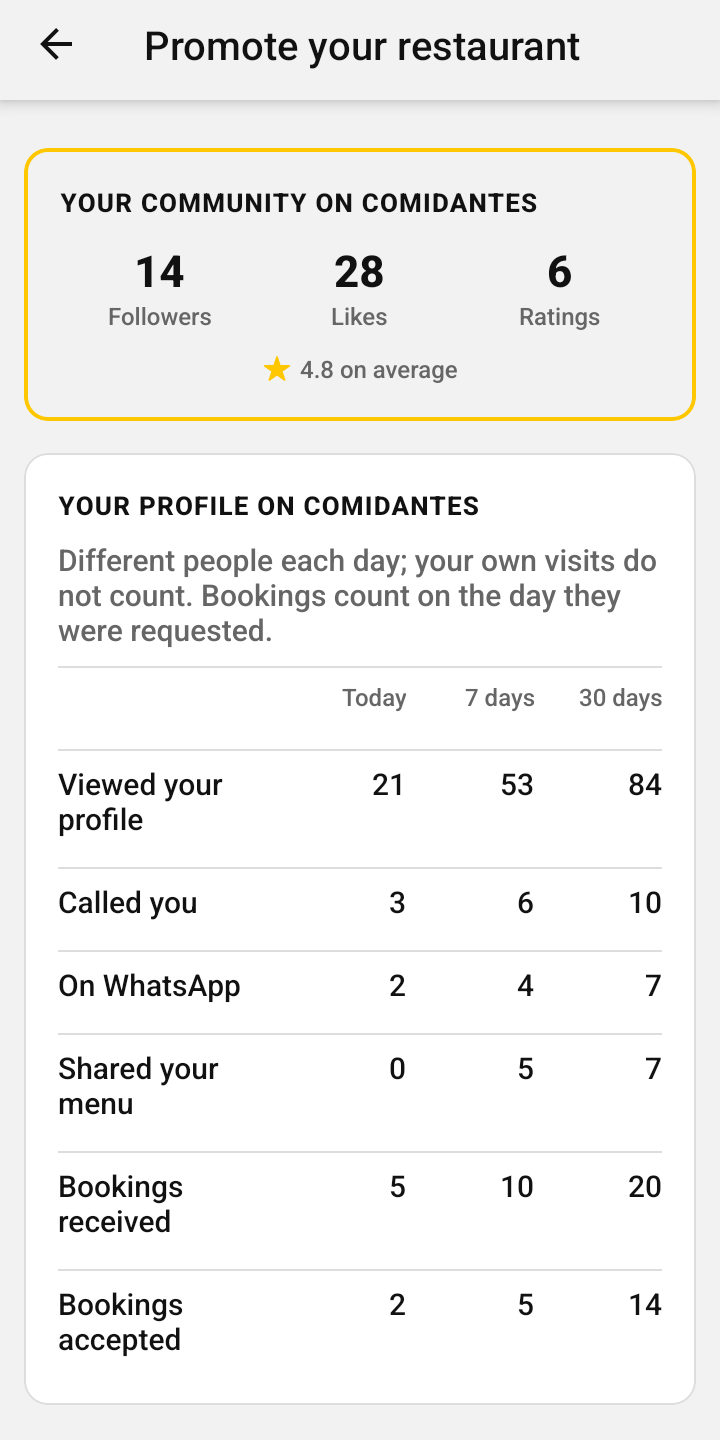
Your page statistics
Views, calls and shares: today, in 7 and in 30 days.
Your community
Followers, likes and your average rating.
Your weekly summary
By email: what Comidantes brought you this week.
Keep an eye on your competition
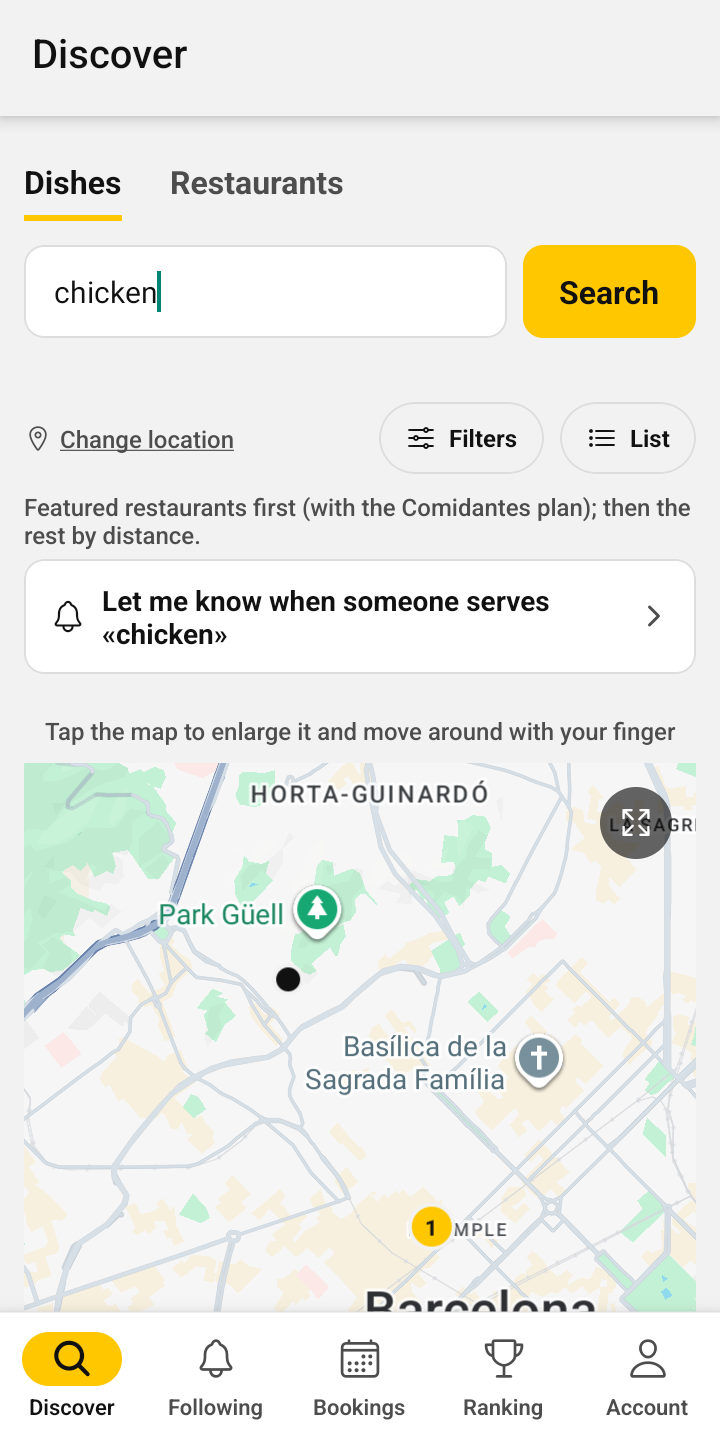
With “Discover as a customer” you see the app just like your customers: what the restaurants in your area offer today.
Their menus today
Their dishes, their photos and what has sold out.
Their prices
And what’s included: drink, dessert or coffee.
Who serves the same
Search for a dish and see who serves it nearby today.
What their customers think
Ratings, reviews and their place in the ranking.
Promote your restaurant
Everything you need for people to follow you, like your dishes and rate you.
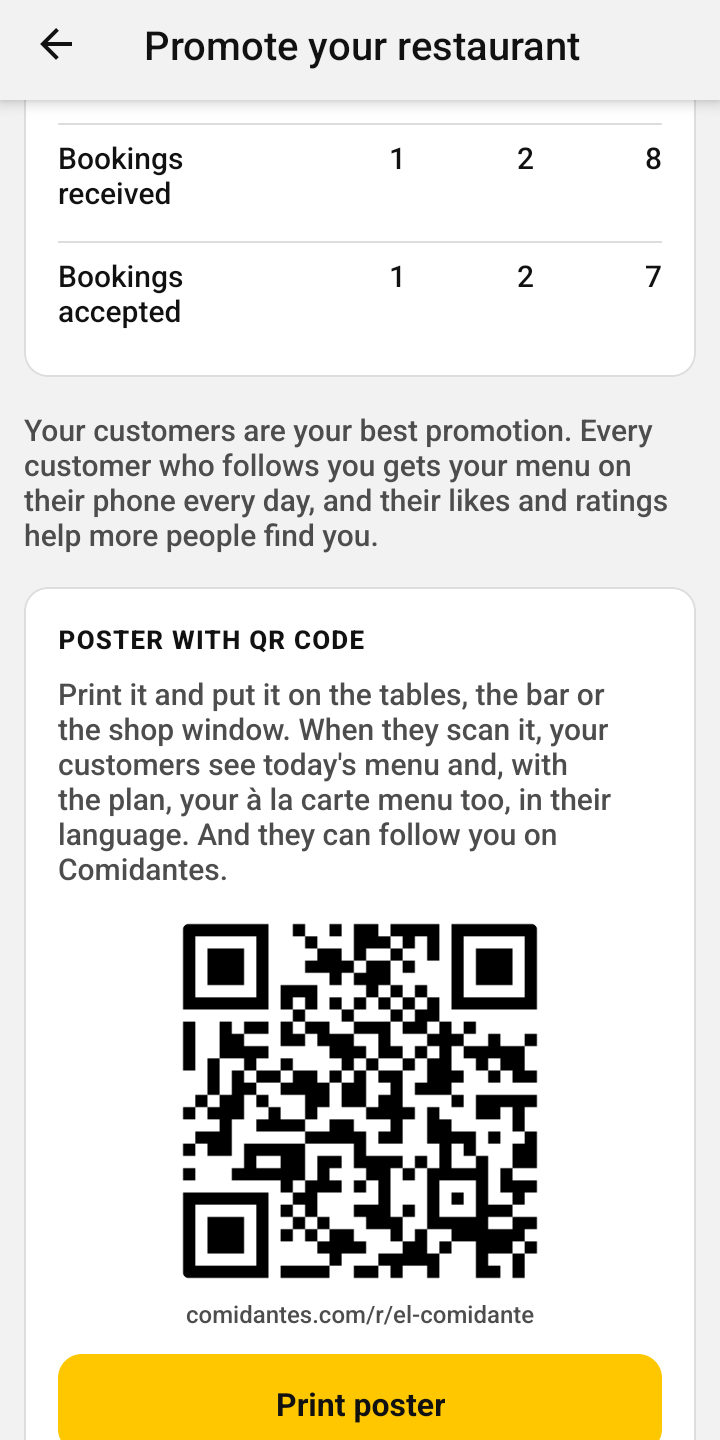
QR code poster
Today’s menu and your full menu, in their language. One QR code for both.
Story image and PDF sheet
For WhatsApp and Instagram, or to print with your logo.
Your page with today’s menu
comidantes.com/r/your-restaurant: it opens without downloading anything.
Reply to reviews
Your reply appears under each one.
Allergens made easy
Giving the allergens of each dish is mandatory (EU Regulation 1169/2011) and builds your customers’ trust. Comidantes makes it easy.
 Gluten
 Crustaceans
 Eggs
 Fish
 Peanuts
 Soy
 Milk
 Tree nuts
 Celery
 Mustard
 Sesame
 Sulphites
 Lupin
 Molluscs
One tap per allergen
The 14 mandatory ones as icons: tick the ones in each dish, without typing anything.
AI helps you
It marks the ones your menu shows and suggests the likely ones for each dish and its usual recipe. You always check them before publishing.
You mark them once
Your regular dishes, templates and full menu keep their allergens for next time.
Clear for your customers
Each dish shows its icons on the published menu and on your full menu.
Simple pricing
Your daily menu (or, if you have no menu, your deals), free forever. And to get the most out of it, the Comidantes plan, with a free 60-day trial for the first 100 restaurants (then 30 days). No card and no commitment.
Free
€0
forever
Everything for your daily menu (or your deals):
- Your daily menu, every dayTake a photo and AI organises it: up to 2 photos a day, with up to 7 starters and 7 mains.
- No daily menu? Your dealsFast food, cafés, takeaways…: publish up to 10 deals at a set price (“Patatas bravas + 2 beers · €7”), with 20 saved and 7 bundles.
- Regular dishes and saved menusUp to 40 dishes and 7 complete menus to build the menu without a photo.
- Allergens and vegetarian optionsShow the allergens of each dish, as required by EU Regulation 1169/2011, and mark vegetarian and vegan ones.
- Sold-out dishesMark what runs out and your customers see it straight away.
- On the map, in searches and the rankingNearby customers find you by your menu and your dishes.
- Call and WhatsApp buttonsYour customers call or message you to book with one tap from your page.
- Delivery ordersYour links on Glovo, Just Eat, Uber Eats or your own online ordering, with a «Delivery» button on your page.
- Several venues, one accountSwitch between them and publish the same menu at all of them at once.
- Notifications to your followersThey get your menu on their phone mid-morning (11:30, 12:30 and 13:15) or, if they prefer, as soon as you publish it.
- Your page, QR poster and image for storiesTo share your daily menu on WhatsApp, Instagram or in your restaurant.
- Reviews and weekly summaryRead what your customers think and get a weekly summary by email.
Comidantes plan
from €14.92
a month, with the yearly plan
Everything in Free, plus:
- More AI photosUp to 5 menu photos a day, also as PDF.
- Your full menuWith photos, prices and allergens, read from a photo or a PDF, and in each customer’s language. The same QR code on your tables opens the daily menu and the full menu.
- Unlimited dealsProducts and packs at a set price, with their hours, alongside your daily menu and full menu.
- Your menu in three languagesIn Spanish, Catalan and English: each customer reads it in theirs, without you translating anything.
- Star dishesChoose up to 5 dishes: their photos are shown in Discover, one after another.
- Table bookingsFrom the app: you accept or decline them and we notify you straight away.
- Reply to reviewsAnswer your customers and let everyone see how you look after them.
- Full statisticsWho sees your page, calls you, messages you on WhatsApp, shares your menu or books (today, 7 and 30 days).
- Your most popular dishesBased on your customers’ likes.
- Detailed weekly summaryEvery week, with your figures and tips to improve.
- Unlimited menus and dishesSave all the complete menus and regular dishes you want.
- Scheduled menuIt publishes itself at the time you choose, and tomorrow’s is ready.
- Sales logNote the menus sold and compare them with previous weeks and months.
- FeaturedFirst in Discover and in the mid-morning notifications to your followers.
- Your team and managersManage the menu with your staff, each with their own account, and appoint a manager for each venue.
Choose how to pay for the plan
Monthly
€29 €19
a month
Quarterly
€75 €49
every 3 months
You save €2.67 a month (14%)
Yearly
€275 €179
a year
You save €4.08 a month (21%)
Launch price until 31 March 2027. The first 100 restaurants to take out a plan will keep it forever as long as they keep it. For everyone else, from 1 April 2027 the price will be the crossed-out one: €29 a month, €75 every 3 months or €275 a year.
VAT included. The three payment options include the same; only how often you pay and how much you save changes. If you leave the plan, your daily menu stays free and everything you created is kept.
Sign in with your restaurant’s account and pay securely by card. If you still have trial days left, nothing is charged until it ends.
Frequently asked questions from restaurants
If you can’t find your answer, write to us.
How much does Comidantes cost?
The trial is free: 60 days for the first 100 restaurants that sign up and 30 days for the rest. After that you choose a plan: monthly (€19), quarterly (€49) or yearly (€179), VAT included. It’s our launch price until 31 March 2027: the first 100 restaurants to take out a plan will keep it forever as long as they keep the plan, and for everyone else it will go up to €29, €75 and €275 from 1 April 2027. They all include exactly the same; only how often you pay and how much you save changes.
I have several restaurants. Can I run them from one account?
Yes. From More → My venues you add another venue, each with its own free trial, menu, à la carte menu and team, and switch between them with one tap. You can publish the same menu at several at once and copy the à la carte menu, deals and dishes from one to another. With the plan, appoint a manager for each venue: they run all of it except the plan and payments, which stay yours.
Can I add my delivery orders?
Yes, for free. In Restaurant details paste your links on Glovo, Just Eat, Uber Eats or your own online ordering (up to 4) and a «Delivery» button will appear on your page. If you have several, the customer chooses where to order.
My business has no daily menu. Is Comidantes for me?
Yes. When you sign up (or later, in Restaurant details) tick “I don’t have a daily menu”: instead of the menu you publish your deals, products or packs at a set price like “Patatas bravas + 2 beers · €7”, with their photo and, if you like, their hours. For free you can have up to 10 published at a time, 20 saved and 7 bundles; with the plan, unlimited and your full menu too. If you do have a daily menu, deals are included in the plan.
Do I need a card to start the trial?
No. You sign up, add your restaurant and start publishing. Payment isn’t active yet: we’ll let you know by email, in advance, how to pay and when it starts.
See all questions (22)
What happens when the trial ends?
Your daily menu keeps being published for free, with its notifications to your followers: you don’t lose any of the basics. What stops is everything in the plan (full menu, bookings, replying to reviews, full statistics, sales, team and photos in Discover): nothing is deleted, it’s paused. Your customers stop seeing your full menu, your team can’t sign in and, of your regular dishes and saved menus, you use the 40 and 7 you choose (if you don’t choose, the most recent ones). When you take out the plan, everything comes back as it was. The app warns you a few days before and you can always see how many days you have left in “My plan”. To keep everything, sign in at app.comidantes.com with your restaurant’s account and choose the plan in “More → My plan”: you pay by card on the website, not inside the phone app. If you take it out before the trial ends, the first payment is on the day it ends.
How do I publish my daily menu?
Take a photo of the menu (blackboard, handwritten or printed sheet) from the app, or upload the PDF if you already have one. AI reads it and sorts it into starters, mains and desserts, with the price, supplements and what’s included (bread, drink, dessert or coffee). You check it and publish it. All in a minute.
What if the AI gets the photo wrong?
Nothing is ever published without you checking it. Before publishing you see the whole menu and can correct any dish, price or allergen, and add or remove dishes. You can also edit the menu after publishing it.
Who is responsible for the allergen information?
The restaurant. AI helps you detect them, but the law (EU Regulation 1169/2011) requires the information to be correct, so always check it before publishing.
Do I have to repeat the menu by hand every day?
No. Save the menus you repeat as templates and publish them with one tap, and save your regular dishes to add them to the menu without typing them again.
Can I prepare the menu the day before?
Yes. With “Prepare tomorrow’s menu” you do it in the afternoon or evening and choose what time it’s published. It publishes itself, and your followers get the notification at that time.
Can I take bookings?
Yes, if you turn them on in the app. Your customers send you a request with day, time, number of people and phone; you get a notification and accept or decline it with one tap. If you’d rather they call or message you, add your phone and WhatsApp to your page.
Can my staff use the app?
Yes. In the app, in More → Team, invite whoever you want with a work email (up to 2 people besides you). They need to create a new account with that email, different from the one they use as a customer, and when they sign in they see your restaurant’s panel: they can publish and edit the menu, the full menu, the regular dishes and templates, note menus sold and manage bookings. They can’t change the restaurant’s details or see the plan or statistics. You can remove their access whenever you want.
Can I print the menu for my restaurant?
Yes. From the panel you create an A4 PDF sheet with your logo, the dishes with their allergens, the price and a QR code for your customers to download Comidantes and follow you. Print it or send it on WhatsApp.
Is there a limit on photos or PDFs?
For reasonable use, AI can read up to 5 menu photos a day and 20 pages of your full menu a month. In a PDF, each page counts as a photo (up to 10 pages per PDF). Publishing and editing by hand has no limit.
How do customers find me?
Your menu appears to people looking for menus nearby, in the list and on the map, and to anyone searching for a specific dish you serve today. Your followers also get your menu on their phone mid-morning (or as soon as you publish, if they prefer), and good ratings move you up your city’s ranking.
How do I get my customers to follow me?
In the app, in “Promote your restaurant”, print the QR poster for the tables or the bar and share your link on WhatsApp or social media. The PDF menu sheet also has the QR code. Tell them when they pay and ask them to like the dishes and rate the restaurant: in the app you’ll see your followers grow.
Can I show my full menu too?
Yes, with the plan. Upload it by taking photos page by page (AI organises it just like the daily menu) or add the dishes by hand, with a price and photo for each dish if you like. It appears on your page next to the daily menu, translated into each customer’s language: the QR code on your tables opens both, without installing anything.
What happens to yesterday’s menu?
It expires by itself every night. Your customers never see an old menu as if it were today’s. If you forget to publish it, the app reminds you at the time you choose.
Can I delete a negative review?
No, reviews belong to customers and only people with an account can write them, one per restaurant. You can reply to each one, and your reply appears underneath. If a review is offensive, false or spam, report it from the review itself and we’ll check it.
Which phones does it work on?
On Android: download it free on Google Play. The iPhone version is coming very soon; meanwhile you can use it in the browser at app.comidantes.com. The app is in Spanish, Catalan and English.
How do I cancel?
Whenever you want, from the app, in More → Options → Delete my account. Your restaurant, menus, full menu and photos are deleted.
Want your restaurant to be among the first?
Read the step-by-step getting started guide or write to us and we’ll help you publish your first menu.
Message us on WhatsApp Restaurant guide (PDF, Spanish)or by email: [email protected]
Looking for somewhere to eat?
Discover the daily menus of the restaurants near you. Free.
Got an iPhone? Use it now
Until it reaches the App Store, add it to your home screen from Safari: it opens full screen, like an app.
- Open app.comidantes.com in Safari.
- Tap Share: the square with an arrow pointing up.
- Tap «Add to Home Screen» (if you cannot see it, tap «View More» first) and then «Add».
- Open it from the yellow Comidantes icon.
Your restaurant, from your phone
Download the app for free and publish your first menu with a photo in five minutes.
Coming sooniPhone, for customersShare it
If you know someone who would find it useful, send them the link.